Monday, March 17, 2014

Lesson 56 - The Cat and the Invisible Pipe

As promised, today it was a day for nc hacking.

First we discussed protocols and addresses. Like 

  • snailmail protocol, where your address consists of your name, street address and zip etc. 
  • email protocol and email address
  • telephone protocol, where the telephone address is the protocol
  • computers talk with TCP/IP protocol and they have an IP address. 
So, we dug out the IP address of her computer using ifconfig. I explained that we are going to create a "pipe" between our computers to be able to send messages and that we're going to use Netcat (nc) for that. I explained also that in TCP/IP you need to use the IP address and a "port" which is just a number and has to be quite big. We agreed on port 10100. I had her write down the IP and the port.


Then we started Netcat on her machine, and made it "listen to" port 10100.

    nc -l 10100

Such excitement! Nothing happend though. The computer is waiting for the other one to connect.


Then we went to my machine and connected it to hers.

    nc 192.168.1.10 10100

So hack! But nothing happens here either. But when I told her that we can now send secret messages though the INVISIBLE PIPE that we just created, her eyes started to glare. So we started chatting through the invisible pipe (a TCP socket really). It even worked when I took my computer downstairs!

After that we did the same but directed the output from Netcat to a local file, as in


    nc -l 10100 >sala

So now we sent message to each other, so that the recipient could only read the message from the file on their machine. She used vim to read the message I had sent to her.

    vim sala

Now she's replying to me using email. Very internet!

Sunday Coding

Yesterday I took a nap with my 2-year old. Meanwhile the 5-year old had played some Move the Turtle by herself.

Later in the evening she wanted a coding lesson from me. Unfortunately it was quite late and I refused, based on earlier experience on coding lessons just before bedtime.

So she gave a lesson herself to her little sister. They hacked on Turtle Roy together.


It was kinda cute.

Saturday, March 15, 2014

Lesson 55 - In the App Store

Today we tried some iPad apps that teach coding skills. We bought Tynker and Move the Turtle for 5 euros or so, which makes this by far the most expensive lesson ever. But education is worth investing right?

The Tynker app has three different "sub-apps", one of which is Sketch Racer, where you must guide a turtle to draw different shapes. The concept of a drawing turtle is of course very familiar to us from Turtle Roy. And the control mechanism is just like in Scratch. You drag pieces of code together to make up the program that moves the turtle. So it was kinda piece of cake to get started with.


I was a bit worried that the big numbers would be a problem. Like, in the very first problem, you had to issue a "Forward 400" command. But fortunately when I showed her that you can use the rulers to measure the lengths of the edges, she got it at once. And started solving problems.

She got as far as the 7th problem. That was the one where you had to use Repeat for the first time. I guess she'll complete the rest of the challenges Sketch Racer challenges later. Then she played Puppy Adventure that she has earlierly completed on the Hour of Code site. And tried the space adventure thingie but that wasn't her thing.


Next up was Move the Turtle. Once again it's about giving commands to a turtle character. But the UI is not very as intuitive for kids. In the Tynker games and Scratch, the building blocks and the available blocks are always shown and clearly indicate which ones fit together. For instance the Repeat block is U-shaped and suggests that you should drag another block inside it.

Trying apps was fun. Maybe we should start writing app reviews and get rich. Naah, next time we'll go command-line and do some TCP/IP hacking with nc.

Saturday, March 8, 2014

Lesson 54 - Straight Cat

Today we agreed to play some Lightbot together. But when we sat down, she wanted to do the Hour of Code first tutorial instead. Except not. One excercise was enough. Then to Lightbot. One excercise and that was enough. She wanted to do stuff with Scratch.

She selected a nice backdrop from the Scratch backdrop library. Then she started drawing some nice animal characters. The dog and elephant are cute. The cat and the mouse come from the Scratch sprite library.


The coding part was that she made the cat rotate forever. As in


The problem for her was that she couldn't get the cat "straight" again. So I suggested that maybe we should add another script that would stop the rotation when the spacebar is pressed. She was ok with that so I showed her the new blocks she needed and this was the new script.


So, in fact you can react to keyboard input in Scratch and you can stop other scripts from running.

Then I showed her the little game I had coded while she was doing this. She liked it, but quickly found it way too easy. Also she wondered why I didn't include any background music. We agreed that she'll make a similar game herself and adds a background tune too.

Not today though.

Tuesday, February 25, 2014

Lesson 53 - #8888FF

Today I promised to show my daughter some new features that I've added to Turtle Roy lately. So we started with the new text function. First on the paper and then in Turtle Roy:

    text "mila"

Once again, I had to remind that the text must be surrounded with quotes. It's actually quite hard to explain why some things need quotes and some don't, when you're explaining to a 4-year-old. Even though she turns 5 in a few days. Fortunately the concept of surrounding with quotes is now familiar and she's also got mad line-editing skills so stuff happens quite quickly now. Except when we get sidetracked, which we do often.

Before the lesson I had flashed her a very nice trick and she wanted to do the same. That is, draw some text repeatedly in a different angle with different colors. I used pen and paper to illustrate how the desired effect can be achieved. Like this.


Then we discussed, once again, how do we make the computer do like "first draw some text and then turn right 45 degrees". By sequencing, of course! We we had this established, she was on the task.

    s [text "MILA", lt 45]

This took like 15 minutes because we went into discussions about the usage of the CAPSLOCK key and how different angles look like and are written. The result was quite cool and she repeated it many a time (8 times to be precise). Then it was COLOR TIME! Not hard to guess which color she picked.

    color "pink"

Once again, the quotes. Before she started repeating the previous sequence 8 times, I suggested that we should create these "text flowers" all around the screen with different colors. And now it seemed like a good idea to use the repeat function to avoid manual repetion. So, we edited our command a bit:

    r 8 (s [text "MILA", lt 45])

It was nice to notice, once again, that line editing and surrounding things with parentheses is no longer an issue. This was easy! And the result was stunning. Her name written like a PINK FLOWER!!!


We moved 100 pixels up with the turle pen up (using penup, fd 100, pendown), then defined a new function like this:

    let mila = r 8 (s [text "MILA", lt 45])

And now drawing another flower, in light blue (#8888ff) was just an issue of

    color "#8888ff"    
    mila

And that was it! Basically we went through the basic programming concepts of repetion, sequencing and functions again, with different examples and had fun. You can have a look at the final program in Turtle Roy here.

Wednesday, February 19, 2014

Lesson 52 - Spam, Eggs and Spam

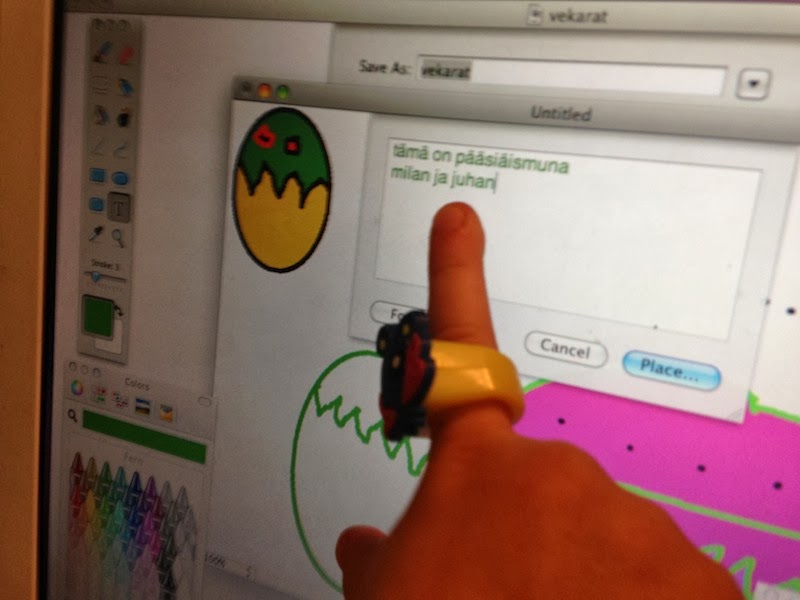
Today she was drawing with Paintbrush by herself. She had already drawn some nice figures (herself and me) when I entered the scene. That was also when the fun stopped. When I started asking her questions and offering advice on having the picture saved, she wanted to stop.

I quick figured she was dehydrated. When offered a drink, she gulped the whole glass of milk at once. And was full of energy again. We continued painting and she learned a bunch of new tools to use. We had fun with different color pickers once again.


She was quite keen on going through the menus and finding all kinds of features there. Indeed, a lot of learning happened even though we didn't actually code this time. Instead she learned some general power-user skills. Like the keyboard shortcuts for Saving (Cmd-S) and Opening (Cmd-O) files and Undo (Cmd-Z).

We ended up making an Easter Egg card with some text. Text that she typed flawlessly. Even the word "pääsiäismuna". Not all adults can type that correctly.


Then she asked if we can send our new  "pictures message" to mom. Yes we can!

So after saving our Easter Egg card, we opened Mail. And whoa, she had got mail from Google+ and Github (yes, of course she has an account). I tried to explain the purpose of those spammish mails to her. And when she saw the embedded video, she told me that it's an "advertisement video". So, she now pretty much understands marketing and spam.

But the point was to send the picture to mom and so we did. New mail (she remembered the button), then attach using the paperclip button and so on. It was a lot of fun that we were doing all this activity secretly from mom. A lot of giggling occurred.

And mom got mail!

Wednesday, February 12, 2014

Lesson 51 - Big In Japan

Just wanted to welcome my newly found Japanese readers!

This is continuation of my story about me and my 4-year old daughter writing a simple game "Princess vs Lion". Please have a look at the previous posts for details!

Today I once again used the cheap trick of starting our session with "code juice" (actually orange smoothie). Also change the original plan of learning Javascript functions to a more visual one. Today it was time to bring the Princess on the stage.


This is a figure my daughter drew a while ago and that we already scanned together on her Macbook. Before today's session I converted the scanned images to PNG format and gave them sensible names: prinsessa.png and leijona.png (princess and lion they are). Then I took her to the command-line prompt again. It was time to recap some file and directory stuff. Like

    mv Desktop/prinsessa.png karkuun/

That was to move the princess image file to the directory where our game-under-development resides. Then

    cd karkuun
    ls

That was to "go" to the karkuun directory and list the files in there. She didn't remember much of the command-line skills we had practised earlierly. Actually ls was the only one she properly remembered. We had a brief look at the files in the directory. Then

    open index.html

.. to open the game's HTML page on the browser. And Cmd-Alt-J to open the "secret drawer" that is the Chrome Developer Tools section where we can play around with Javascript. This 3-finger shortcut she did remember, with just a little help. Then I introduced to here a newly written helper function "image" that can be used to display an image on the page. So by running

    image("prinsessa.png")

...we got the picture of the princess on the page. There was much rejoicing. And by the way at this point we had spent like 15 minutes mostly discussing this and that and singing and laughing and doing occasional somersaults on the bed. And doing computer stuff in the middle. She had had the idea that we'll so a little theatrical show right after our session to the rest of the family. It was a bit hard to concentrate, but it was fun anyways.

Yet, she wanted to save our work before quitting. So we went to command-line, used vim to add the same piece of code

    image("prinsessa.png")

...to our main Javascript file game.js. Then was time for the show. It was a success and the audience (mom) gave a standing ovation. Good times!

Oh and I told her that people in Japan are reading about her adventures.